Setting up and auditing SAP security policies (SECPOL)
Since EHP 6, password rules can be tightened per user group through security policies. Anyone who checks only the profile parameters misses them. How security policies are set up and evaluated.
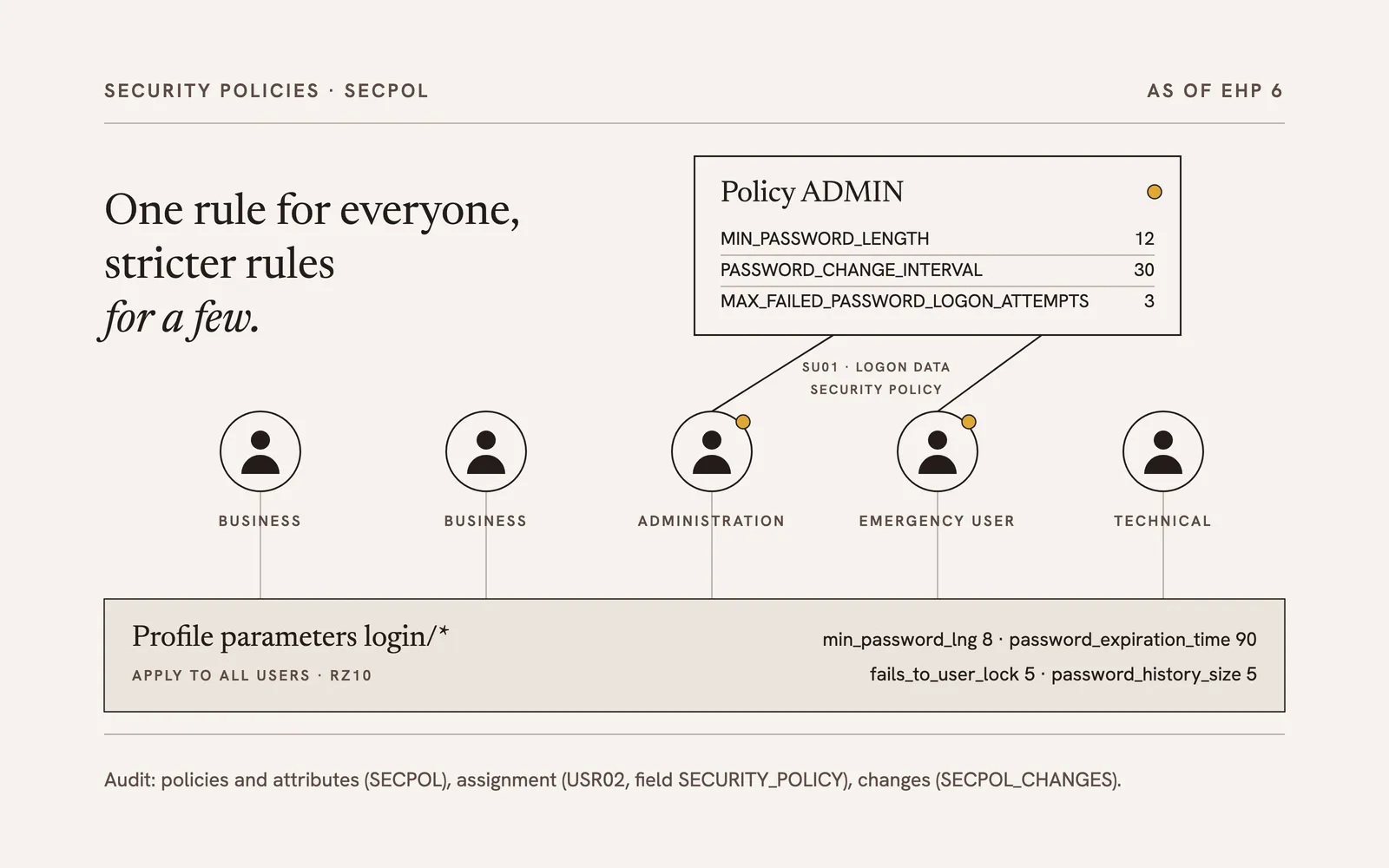
For a long time, password rules in SAP were a matter of profile parameters: one rule, one system, all users. Since EHP 6 there are security policies, which allow the requirements to be differentiated per user group. That is a gain for operations and, for the audit, one more place that has to be read.
Starting point: one rule for everyone
The password requirements of an SAP system are defined in the profile parameters with the prefix login/, maintained for example in transaction RZ10: login/min_password_lng for the minimum length, login/password_expiration_time for the validity in days, login/fails_to_user_lock for the number of failed attempts before the lock, plus the rules for digits, letters, special characters and the password history.
These parameters apply system-wide and regardless of a user’s authorizations. Privileged user IDs, for instance for system administration or emergency user sessions, cannot be secured separately with them. A password validity of 30 instead of 90 days for administrators cannot be achieved with profile parameters alone.
Security policies as of EHP 6
EHP 6 introduced security policies. They are created in transaction SECPOL, or alternatively in the implementation guide under SAP NetWeaver › Application Server › Users and Authorizations › Security Policies. A policy gets a name and a description; the actual requirements are stored in it as attributes, reached by double-clicking “Attributes”.
The attributes are named differently from the profile parameters but follow the same logic. The most important pairs:
| Policy attribute | Profile parameter |
|---|---|
MIN_PASSWORD_LENGTH | login/min_password_lng |
PASSWORD_CHANGE_INTERVAL | login/password_expiration_time |
MAX_FAILED_PASSWORD_LOGON_ATTEMPTS | login/fails_to_user_lock |
PASSWORD_LOCK_EXPIRATION | login/failed_user_auto_unlock |
MIN_PASSWORD_DIGITS, MIN_PASSWORD_LETTERS, MIN_PASSWORD_SPECIALS | login/min_password_digits, login/min_password_letters, login/min_password_specials |
PASSWORD_HISTORY_SIZE | login/password_history_size |
The complete mapping is in the SAP Help on security policies.
A policy is assigned per user in transaction SU01, tab “Logon Data”, field “Security Policy”. Policies act in addition: the profile parameters continue to apply to all users, the attributes of the policy only to the users it is assigned to. A policy can set stricter values, for example for administrators, but also different rules for technical user IDs.
Two notes from practice:
- Set every relevant attribute explicitly. Do not rely on an attribute that is not maintained in the policy falling back to the profile parameter. The “Effective” button in SECPOL shows which values actually apply for the policy.
- Document the policies. Who gets which policy and why belongs in the authorization concept; otherwise a second, undocumented set of rules grows next to the roles.
Consequences for the audit
An audit of the password rules that is limited to the profile parameters, for instance via the standard report RSPARAM, gives an incomplete picture as of EHP 6. Users can be protected more strictly or more weakly through a policy than the parameters suggest. Without an audit tool, this procedure is recommended:
- Read the policies and attributes: check in SECPOL or in the implementation guide which security policies exist and which attributes are set with which values. The data is in tables SEC_POLICY_CUST and SEC_POLICY_ATTR.
- Check the assignment: in table USR02, the field SECURITY_POLICY shows which users have a policy assigned. Of particular interest are the user IDs where a stricter policy is expected, and those that surprisingly carry a weaker one.
- Trace the changes: transaction SECPOL_CHANGES shows when policies were created or changed. Auditors look out for a policy that was created shortly before the audit.
Assessment
Security policies solve an old problem: privileged user IDs can finally be treated more strictly than the rest without setting the whole system to the sharpest rule. For the audit this means the question “Which password rules apply?” can no longer be answered with one look at RZ10. Since EHP 6 it has three parts: parameters, policies and their assignment to users.
A more detailed version of this article, in German and with screenshots, was published on the expert blog rz10.de: SAP-Passwortregeln: Profilparameter und Security Policies via SECPOL.