Setting up and auditing the kernel parameters of the SAP Security Audit Log (SAL)
Since EHP 7, the Security Audit Log can be configured system-wide through kernel parameters. They override the profile parameters. Anyone who only checks RZ10 during an audit can get it wrong.
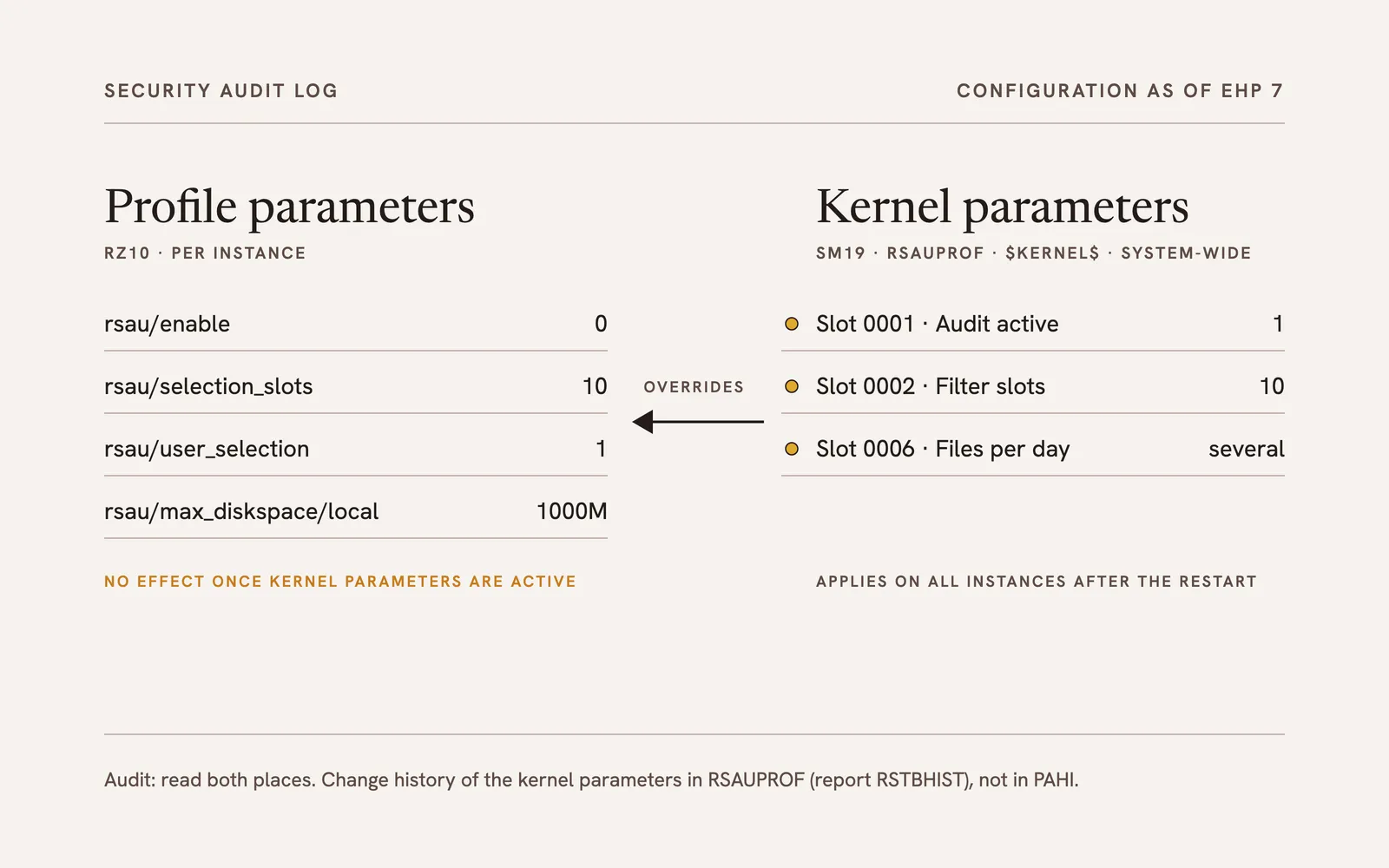
For auditing an SAP system, the Security Audit Log (SAL) is one of the most important sources. With EHP 7, the way it is configured has changed: alongside the profile parameters there are now kernel parameters that apply system-wide and take precedence. Anyone who does not know this audits in the wrong place.
Why the Security Audit Log matters for the audit
An ERP system is subject to legal requirements on the accuracy of data and the traceability of changes. In practice, this leads to a system landscape of at least development and production, and to the segregation of duties between IT and the business departments. Particularly critical are accesses that deliberately suspend this segregation, such as emergency user sessions.
This is exactly where the Security Audit Log comes in: it records security-relevant events per user in a protected area, independently of the application’s change documents. In internal audit and in the audit of the annual financial statements, it is therefore a central source of evidence. For that evidence to hold, the log must be complete, permanent and configured identically on all instances.
Configuration up to EHP 6: profile parameters and SM19
Up to EHP 6, the Security Audit Log is set up in transaction SM19, in two variants:
- Static configuration: The settings are stored as profile or instance parameters in the database and are active after every system start. Permanent operation requires an active static configuration. Filters define which users or user groups are recorded; how many filters are possible depends on the release.
- Dynamic configuration: The log can be switched on and adjusted during operation, without a restart. Only the number of parallel filters is fixed.
Among the settings are the clients to be logged, the audit classes (for example dialog logon or RFC logon), the event category (all, critical, severe) and the size and location of the audit files. The most important profile parameters are rsau/enable (log on or off), rsau/selection_slots (number of filters), rsau/user_selection (user filter) and rsau/max_diskspace/local (disk space).
During an audit, transaction RZ10 is usually used to check whether these parameters meet the regulatory requirements, the company’s policies or common recommendations. In addition, table PAHI shows whether parameters were changed at short notice, for instance right before the audit.
As of EHP 7: kernel parameters in SM19
With EHP 7, the tab “Kernel Parameters” was added to SM19. It activates and configures the Security Audit Log system-wide, much as the security policies for passwords (SECPOL) apply system-wide. Three points are decisive:
- Kernel parameters override the profile parameters. Once they are set, the familiar
rsau/*profile parameters have no effect. Anyone who wants to keep working with profile parameters has to switch the kernel parameters off. - Maintenance no longer happens in RZ10, but directly in the Security Audit Log. RZ10 may therefore show a value that does not apply.
- The values are stored in table RSAUPROF. For this, the system creates profiles named
$KERNEL$; each slot stands for one parameter. Slot 0006, for example, decides whether several audit files are written per day.
A confirmation prompt appears on activation. If it is answered with no, the application servers are not configured consistently.
What this means for the audit
An audit that reads only the profile parameters can be misleading as of EHP 7: a log that appears to be switched off via rsau/enable = 0 may well be active through kernel parameters, and conversely a set profile parameter says nothing about what is actually being logged. The change history is also kept in a different place: changes to the kernel parameters are not in PAHI but are written through table logging (rec/client) for RSAUPROF.
For the audit, this means:
- Read both places: the profile parameters in RZ10 and the “Kernel Parameters” tab in SM19.
- Determine what applies: if kernel parameters are active, they count, not the profile parameters.
- Evaluate the history: with report RSTBHIST (for example via SA38) for table RSAUPROF, searching for the
$KERNEL$profiles. PAHI alone is not enough. - Check consistency: with kernel parameters the setting applies system-wide; with profile parameters the comparison across all instances is still necessary.
Assessment
From a compliance point of view, the change is progress. Kernel parameters apply system-wide after the restart; the risk that distribution to individual application servers fails and the log is missing there no longer exists. The auditor no longer has to check every instance individually for consistency.
Two things remain unsatisfactory. Depending on the release, two places have to be checked, profile parameters and SM19. And table RSAUPROF was designed for the filters; with the $KERNEL$ profiles it is repurposed, and the inconsistent structure makes the evaluation more cumbersome than it needs to be.
Note: In newer releases (from SAP NetWeaver 7.50 with Support Package 03, and thus also in S/4HANA), transactions RSAU_CONFIG, RSAU_READ_LOG and RSAU_ADMIN replace SM19, SM20 and SM18. The distinction between profile and kernel parameters and the storage in RSAUPROF remain.
A more detailed version of this article, in German and with screenshots, was published on the expert blog rz10.de: Kernel-Parameter für das SAP Security Audit Log (SAL): Vorsicht vor Inkonsistenzen.